What’s new in Magnetic - May 2026
Released: May 2026
This release brings major updates to time tracking, invoicing, accounting integrations, and the workflow engine. Modern Timesheets brings a real submission and approval flow to time tracking. Multi-job supplier invoicing lets a single document cover line items from multiple jobs. QuickBooks and Sage X3 join Xero and Sage on the list of supported accounting solutions. And the workflow engine has been rebuilt, with consolidated triggers, before-and-after values for conditional automation, and a new real-time rule type that stops actions before they happen.
There's also a long list of smaller updates across billing, approvals, custom fields, rate cards, and the rest of the product. The full breakdown is below.
We've also released a long list of smaller updates across billing, approvals, custom fields, rate cards, and the rest of the product.
Major feature changes
Workflow consolidation and deltas
Building workflows just got simpler. Several trigger types that used to be separate are now combined into a single type. Task Create and Task Update, for example, have become a single Task Create or Update trigger, with a variable you can check to tell which of the two events fired. If you’ve been duplicating workflows so they can fire from both, you can collapse them into a single workflow.
There’s also a comprehensive set of before-and-after values available on any workflow that edits an entity. That means you can build a workflow that fires only on a specific change (for example, when a task status moves from “In Progress” to “Blocked”) without nesting conditionals.
Some workflows built off the old triggers are now deprecated. You’ll see them marked with STRIKETHROUGH on the Workflows page, and each one has a one-click upgrade. Magnetic will convert it into the new consolidated format and add the conditionals where they’re needed. A “Task Created” rule, for instance, becomes a “Task Created or Updated” rule with a “Newly Created is TRUE” condition added.
Workflow rules
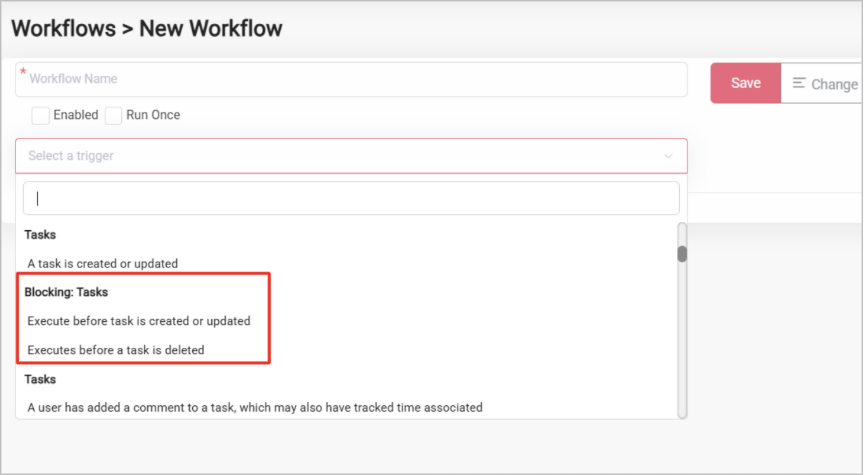
A new class of workflow called Blocking Rules. The existing workflow triggers the queue and fires after something has already happened. Blocking Rules run in real time, so they can stop the action before it goes through and surface a custom error message of your own through a new Interrupt Action.
An example: say you don’t want users to add a company with the word “Legal” in the name. Set up a Blocking Rule that fires when companies are created or updated, match on the name containing “Legal”, and run an Interrupt Action with whatever error message you want shown.
Company links
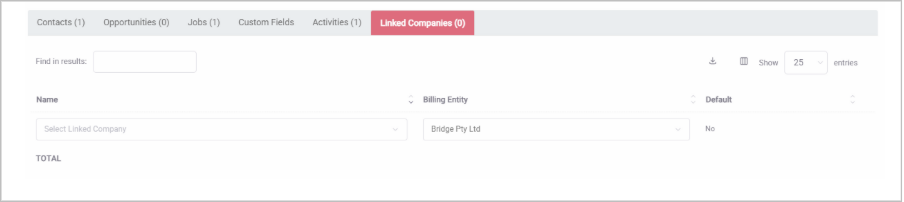
Companies can be linked to other companies and to themselves. The links table sits on the View Contact Company page and is set per billing entity. Use it to map the relationships between business entities that share a hierarchy, a partnership, or a billing arrangement.
For example, if your client has multiple billing entities you no longer need to create these as separate companies in Magnetic, but instead you can simply link the entities as Linked Companies.
When you pick a company on a Cost Estimate, Tax Invoice, or Credit Note (directly or via a Job or Opportunity), Magnetic uses those links to select the correct company to bill, taking the billing entity, the default link status, and supplier or customer approval into account.
Currency Exchange Rates
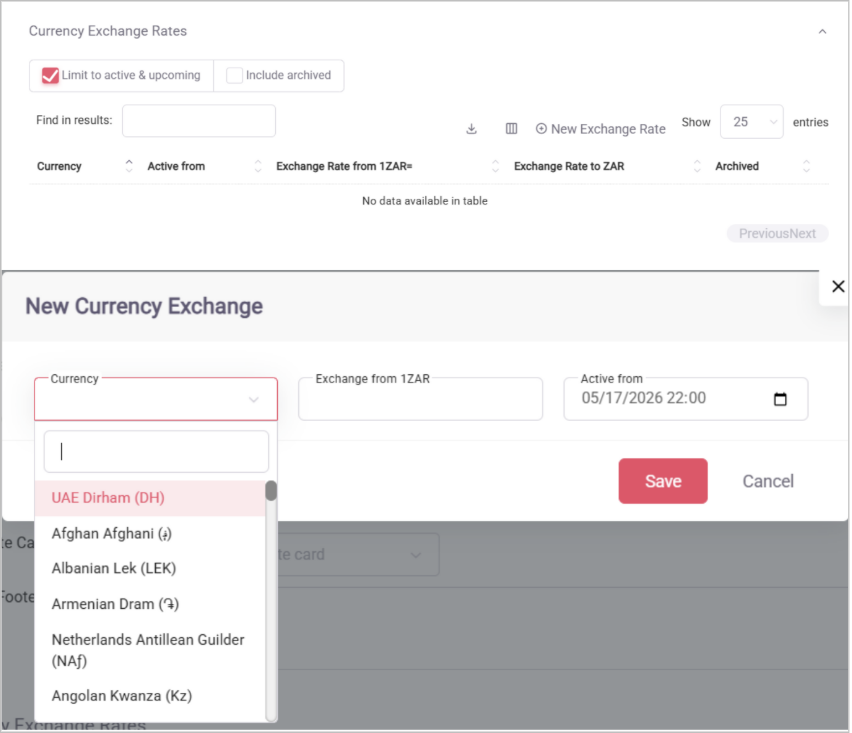
Billing entities can maintain a list of exchange rates between their currency and any other currency, each with a valid-from date. When you select a currency on a financial document, the active rate is automatically selected and takes priority over anything entered by hand.
Line Associations
Line items on financial documents can now carry their own associations, set through an @mention-style menu. Tag a line to a user, a job, a company, a contact, a department, or a purchase order.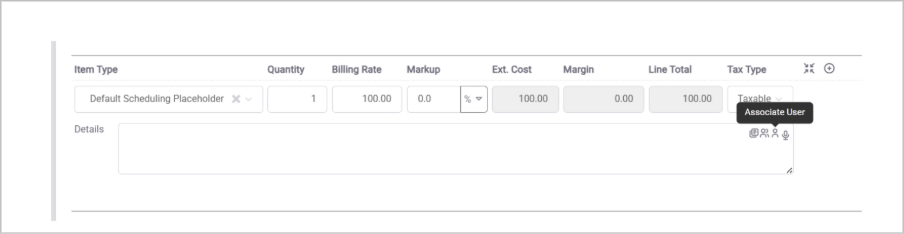
Timesheet Approvals
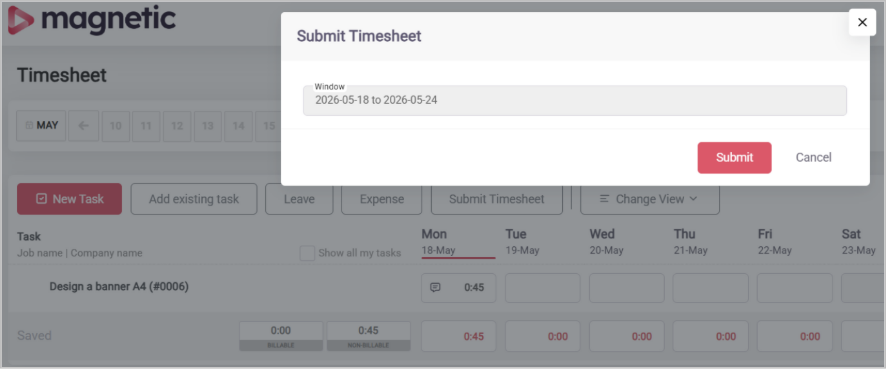
You can now submit timesheets from your personal Timesheet page. Pick a window that doesn’t overlap with anything already submitted, hit Submit, and the timesheet runs through the standard approval's workflow the same way a cost estimate or invoice would. No further time can be tracked against the timesheet while the approval is open.
Multi-job Supplier invoices
Tag invoice lines to different jobs, and a single Supplier invoice can now cover several Jobs at once (sometimes called a slush fund). Each job only sees the lines tied to it on its own side of the system. Opening the invoice for editing brings up the full multi-job document.

New integrations
QuickBooks
QuickBooks is now a supported accounting integration. Once the Quickbooks integration is enabled, you can automatically export finance documents from Magnetic directly into your connected QuickBooks account.
Sage X3
Sage X3 accounting integrations are now supported, alongside the existing Sage integrations.
Minor feature changes
Official Job and Opportunity templates
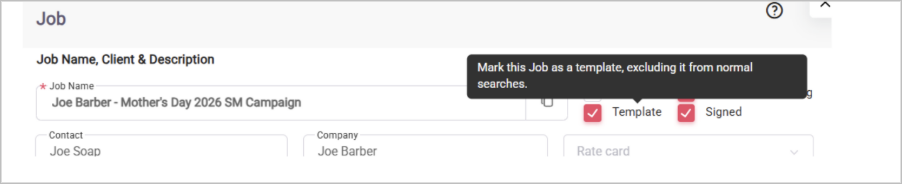
Jobs and Opportunities can now be officially marked as Templates, which complements the existing convention of just naming them as templates. Anything tagged this way is excluded from normal autocomplete searches and prioritised when you go looking for a template inside the job edit modal.
Workflow Iterators
Workflow actions can now carry an “iterator” tag, which lets the action repeat multiple times based on a chosen key. A common use: create a task for every tag on a new job.
This one’s in Beta, so treat it that way.
Required approver count
Approval template stages can now carry a “required” number, which specifies how many approvals must come in before the stage progresses. Useful when you want to assign a stage to a pool of approvers and have it move forward as soon as one or two of them sign off.
Custom fields for Users
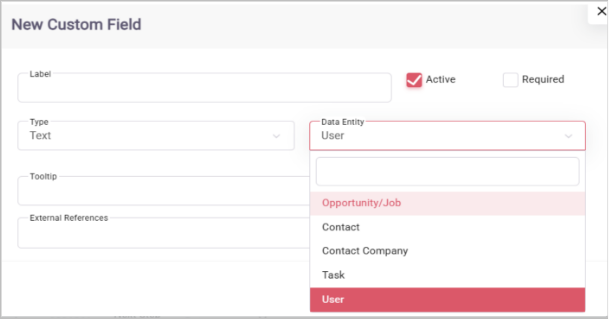
User objects now have their own Custom Fields. The values can be updated via the importer and via the API.
A word of caution: these fields are visible to anyone in the company. They aren’t suitable for protected HR data or anything else covered by your PII obligations that shouldn’t be seen by other users in the same account.
Quality of life updates
Inferential fields and referenced custom fields
Custom fields can carry a list of “API Reference” fields, which can be used in place of their numeric IDs when updating via the Magnetic API. The aim is to make third-party integrations smoother and reduce back-and-forth during setup.
Some API items can also be referenced by unique fields other than their IDs, such as users' emails and companies' names. Available for Jobs to start with; more entity types will roll out over time.
Workflow conditions
and: now works the same way as or: on workflow conditions. A condition only passes if all chained and: items are matched. Two new operators are also available: Does not start with and Does not end with.
New company configuration settings
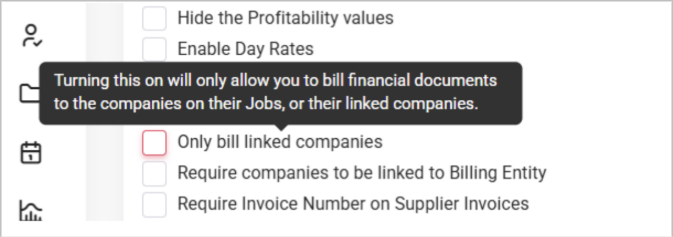
Only bill-linked companies. Prevents users from selecting Jobs or Opportunities on Tax Invoices and Credit Notes unless those Jobs or Opportunities are linked to a Company.
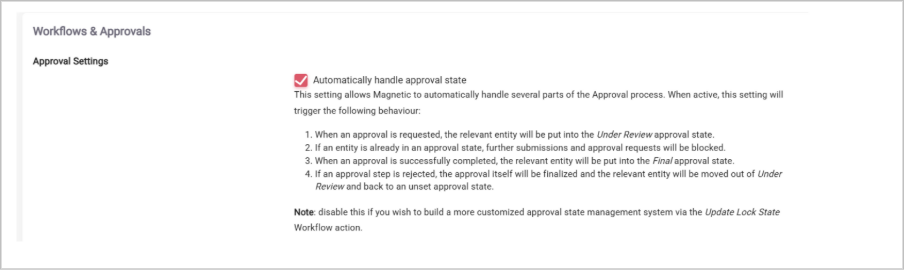
Automatically handle approval state. When this setting is ON (default), Magnetic handles the approval state of an object for you. A new approval request moves the object to Under Review. Further submissions and approval requests are blocked while the approval is open. A completed approval moves the object to the Final state. A rejection finalises the approval and puts the object back to no status.
Switch it off if you’d rather build a more customised state-management system using the Update Lock State workflow action.
Automatically request timesheet approval from the Line Manager. When this setting is ON (default), a submitted timesheet creates a single-step approval for the submitter’s line manager. If the submitter doesn’t have a line manager configured, they can self-approve from their own My Hub Actions.

Additional job info on Task Print views
Task print views (for tasks and their comments) now include this Job information: code, name, company name, author name, last modified date, status change date, activity date, winner name, created date, percentage complete, rate card name, amount and monthly amount, tracked billable total, start and end date, archived and complete status, tags, and custom fields.
Custom Fields moved
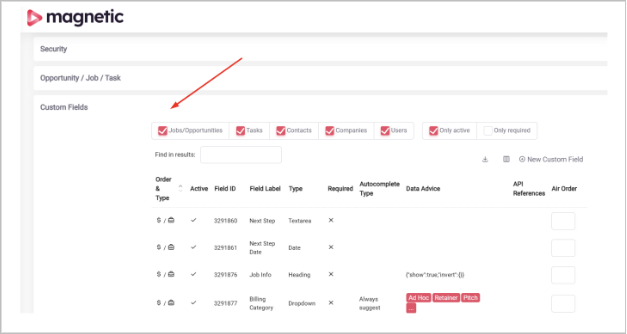
Custom Fields are now live directly on the Company Settings page, instead of on a separate page accessible from Company Settings. One fewer click.
Rate card priority
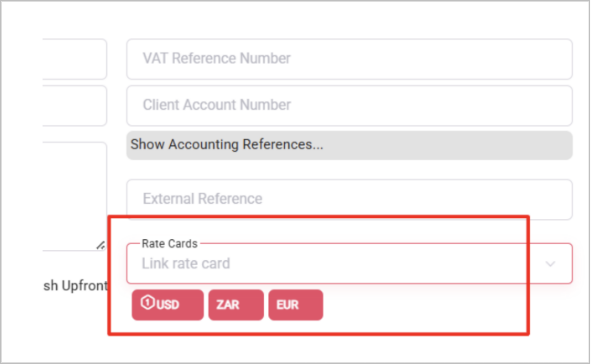
Companies with multiple rate cards can now order them. The order sets which rate card gets picked first whenused on financial documents or linked to jobs.
Lock internal item types
Item types can be locked to internal markup, preventing changes to that value in financial documents. Items locked this way also can’t be used on Purchase Orders or Supplier Invoices.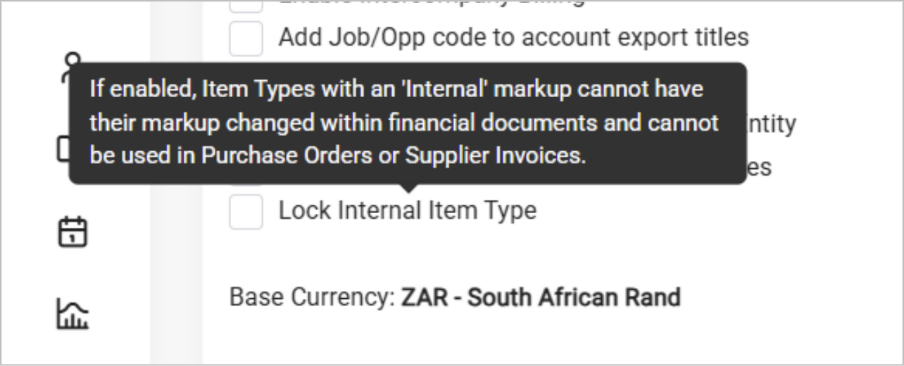
Default Rate cards on billing entity
Billing entities can carry a default rate card, which is automatically applied when that entity is selected for a job.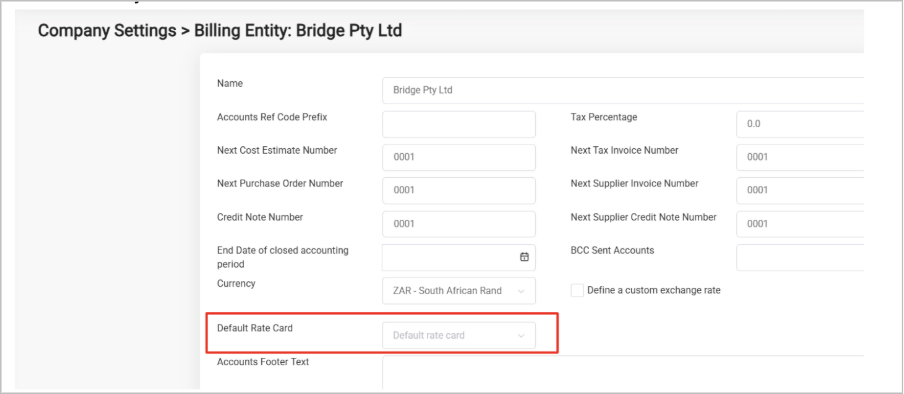
Account closing dates on Billing Entity
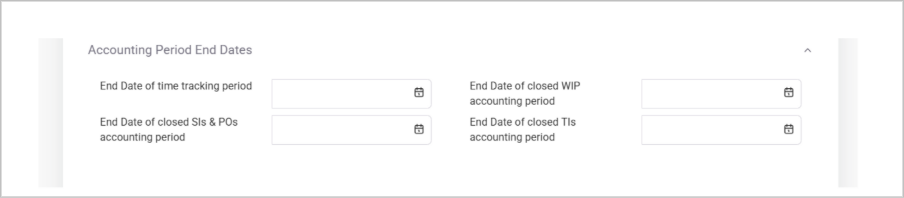
Closing dates can now be set at the billing entity level for accounts payable, accounts receivable, time tracking, and adjustments. Anything dated before those values is locked from modification. This ensures that when month-end reporting has been done no finance records can be added in a locked period.
Cost Estimate approval stamp
Cost Estimates in the Client Approved status now print with an approval stamp.
Attach Cost Estimate to emailed Tax Invoice
You can now attach the associated cost estimate PDF when emailing a tax invoice.
Job restrictions: finance and tracking
Each Job or Opportunity can now be set to allow or block financial documents and time tracking independently.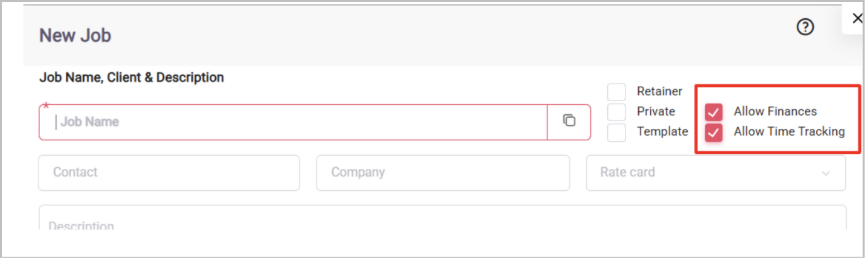
Financial Document Submissions
Financial documents now have a Save and Submit option. It behaves like Save and Close, but additionally fires a Submitted workflow trigger that you can hang specialised workflows off.
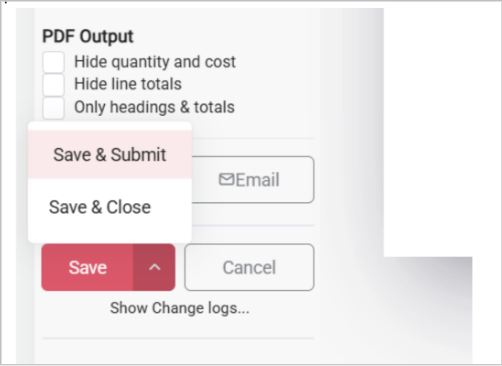
[Screenshot: Save dropdown showing the Save & Submit option]
Approval information on financial documents
Viewing a financial document now includes its approval history. An Approval State column has also been added to financial document list views.
Requested approvals and visual updates
You can now see the approvals you’ve requested on your My Hub Actions. The approval display has had some visual updates so the current status is easier to read at a glance.
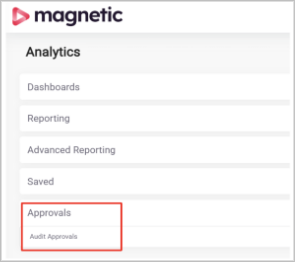
Approvals Audit now available under Analytics
The Approvals Audit report is now available directly under Analytics. No more digging through Company Settings to get to it.
Better task update notification processing
Task update notifications are now condensed and collapsed more often. Fewer of them stack up in short bursts.
Billing Categories
Item types can be set to always use the default GL codes from a billing entity when creating an invoice. Billing Categories add a layer of flexibility on top: if a job has a billing category set, any item types using the default GL codes will use the GL codes on the billing category if they’re present.
Better conditional custom field handling
Invalid or hidden custom fields are now hidden on print pages and entity views too.
Additional Company fields
Contact companies can now carry Client Account and Registration numbers. They can also be marked as Billing Only, which prevents them from being linked to Jobs.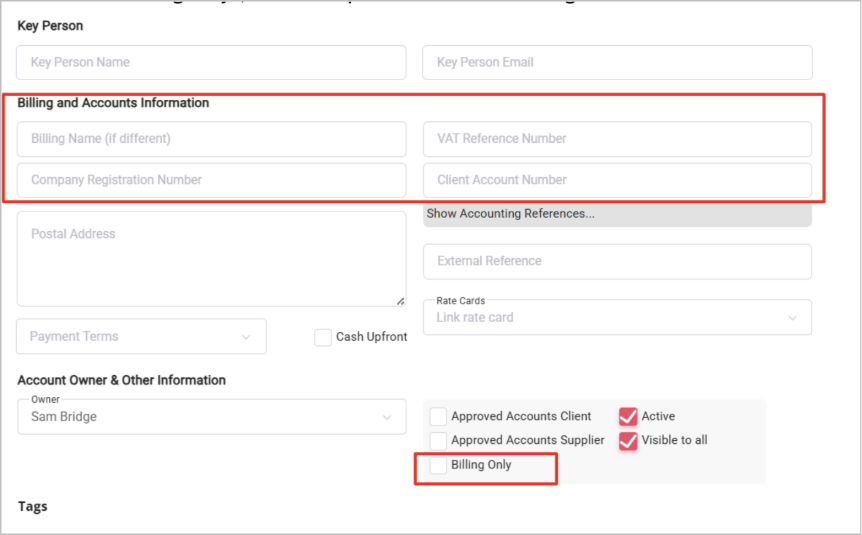
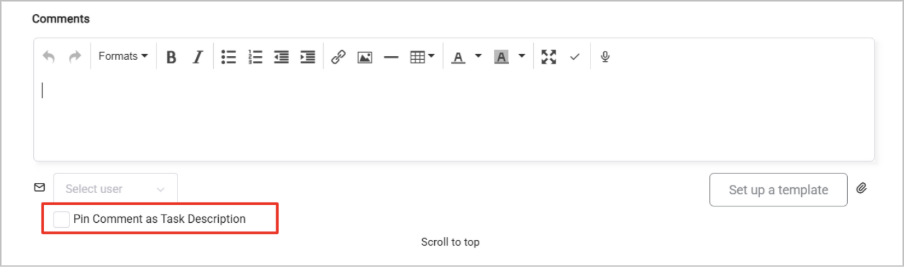
Pin comments during creation
Comments can be pinned at the point of creation in the Task modal. When you save with Pin Comment as Task Description ticked, the comment is pinned and set as the task description automatically.
Important bug and stability fixes
- Xero no longer exports accounts in Draft status
- Workflow handling of empty values is more robust
- API endpoints that returned errors when fetching objects with missing fields are now more robust
- Importers catch certain errors (such as names being too large) before they throw an unrecoverable error
- Fields that previously included unnecessary trailing, leading, or internal whitespace are now sanitised more consistently
- Intelligent caching has reduced the size of calls to Magnetic significantly in several cases
- Workflows and Workflow Fields that were named incorrectly have been renamed
- Avatars load faster across multiple pages
- Reordering Custom Fields has better conflict resolution in edge cases, preventing “unorderable” lists
- Saved searches retain column order more consistently
Was this article helpful?
That’s Great!
Thank you for your feedback
Sorry! We couldn't be helpful
Thank you for your feedback
Feedback sent
We appreciate your effort and will try to fix the article